
The MobiRule form filter provides greater visibility and control over when MobiRules are triggered based on form completion.
If a MobiRule is configured to trigger when a work order is closed or its status changes, you can use the filter to specify whether forms must be completed before the MobiRule executes.
To update the MobiRule form filter, first access the View page of the desired MobiRule. From the "Type" section, select the "Form Filled Check" option, then select the desired forms in the "Form Selection" panel:
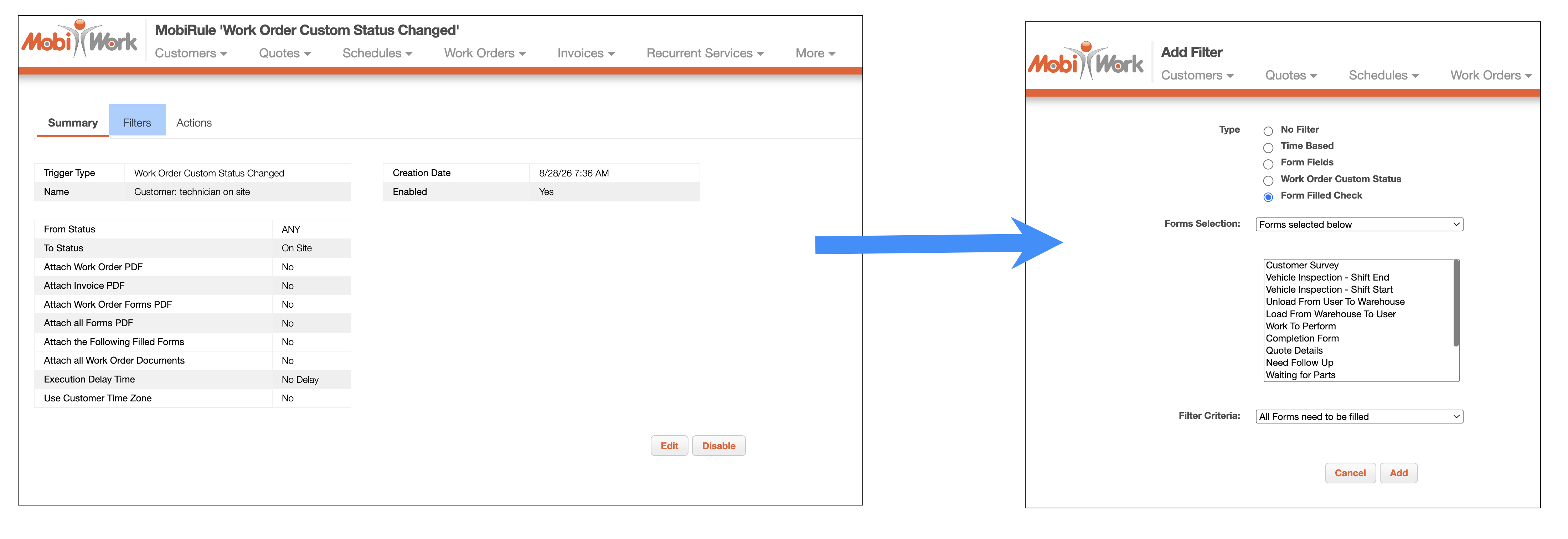
You can specify one of the following criteria from the "Filter Criteria" drop-down:
Any of the forms filled- The MobiRule triggers when at least one associated form has been completed.
All Forms need to be filled- The MobiRule triggers only when all associated forms have been completed.
None of the forms are Filled- The MobiRule triggers when none of the associated forms have been completed.
The MobiRule executes only when the selected form completion criteria are met. This is particularly useful when configuring automated email notifications with completed forms attached, as it prevents emails from being sent without attachments when no forms have been completed. By applying this filter, you can ensure that MobiRules respond appropriately to the completion status of work order forms and that automated actions are triggered according to your specified requirements.
Once you are satisfied with the forms and filter criteria selected, click the Add button to update the MobiRule form filter.