

Stay informed and in control of your time management with our user-friendly interface.. This section will highlight how to efficiently halt an ongoing time tracking activity created from the Add Time Tracking: Duration pop-up window.
For more information on how to create an ongoing time tracking event, please see the Add Time Tracking for more information.
You can easily identify ongoing time tracking events by the presence of a Clock icon in the time tracking column. An example of the Clock icon is illustrated below:

There are several different ways that you can stop an ongoing time tracking. The subsections below will show the most common methods:
Add Time Tracking: Duration
One of the easiest methods for stopping an ongoing time tracking, is through the Add Time Tracking: Duration pop-up window. For more information on how to access this pop-up window, please see the Add Time Tracking page.
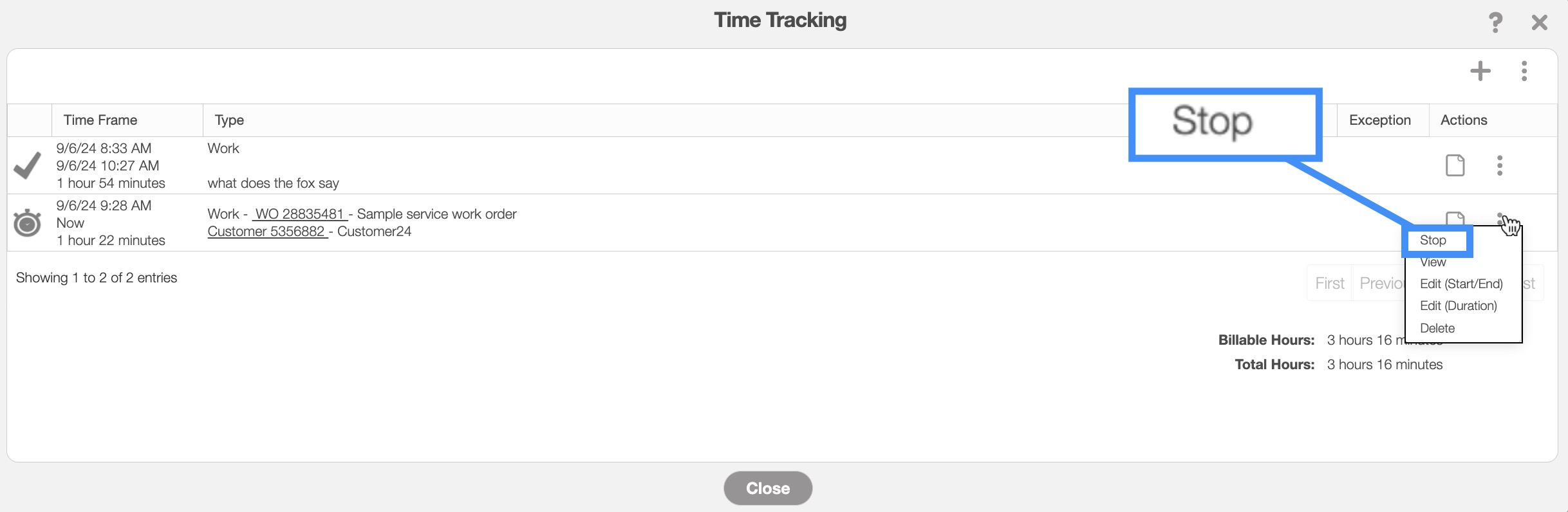
Once you have opened the Add Time Tracking: Start pop-up window, click the "Stop" option from the drop-down:
View Work Order Pop-up Window
You can also stop an ongoing time tracking through the View Work Order window. For more information on how to access the View Work Order pop-up window please see the View Work Order page.
online-help.platform.features.timetracking.stop.timetracking_stop_access_workorder.page1

online-help.platform.features.timetracking.edit.timetracking_stop_access_workorder.page2

online-help.platform.features.timetracking.stop.timetracking_stop_access_workorder.page5
online-help.platform.features.timetracking.stop.timetracking_stop_access_workorder.page4
online-help.platform.features.timetracking.timetracking_stop_clock.paragraph
online-help.platform.features.timetracking.timetracking_stop_clock.paragraph1
